I first signed up to Roam on 28 December 2019.
Before that I’d used many different pieces of software to take notes, including but not limited to OneNote, EverNote, Todoist, etc. I’d had random floating Word docs aplenty. Since then I’ve tried other apps like Notion and Obsidian.
Roam is by far the best note-taking tool I’ve ever used. I’m still using it in 2026. In this post I’ll explain what I use Roam for and why it’s still my go-to.
Why care about a productivity app?
But first, why care? Those who know me from work may think this post is a bit random. After all, it’s just a note-taking app.
The way I see it, however, optimising productivity is mission-critical. My professional mission is simple: to contribute what I can to halting dangerous climate change, which at the moment is via phasing out oil and gas production and ending public finance to fossil fuels. Besides, in my personal life I have various goals and dreams. I care about those missions, goals and dreams a lot, and if a piece of software gives me a leg up on that, you bet I’m going to use it.
Now, your mission may well be different than mine. But regardless of what your goals and visions are, I’d argue that a good note-taking app will nearly always help.
Put another way, if optimising my note-taking and project management makes me just 2% better at my job, that’s well worth it for me. (I think the true number here is more like 5-10%.)
Roam is my exo-brain
So, on to the substance. What is Roam? Well, it’s an indispensable tool for thinking. I have used it, for example, to
- journal,
- take reading notes,
- take research notes for, and outline, my book,
- manage my projects at work,
- manage relationships,
- make to-do lists,
- set and track goals,
- and much more besides.
Each day that I log in, a new daily notes page is automatically generated and becomes my homepage. Here’s an excerpt from one of mine:
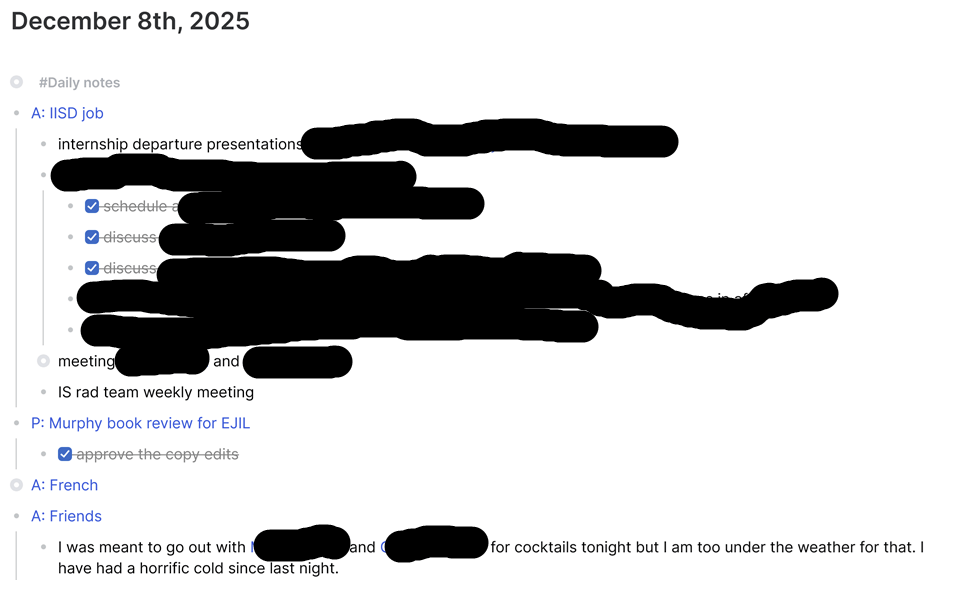
RIP my evening plans.
One of the most genius features of Roam is the bidirectional links. It’s very simple to create a new page: when you’re typing on any page, just put double square brackets around a word or words, which then becomes an empty page. In the screenshot above, an example of a page is [[A: IISD job]], in blue. When you click on [[A: IISD job]], at the bottom you can see every time [[A: IISD job]] has been mentioned on any other page. That simple improvement in functionality enables all kinds of linkages to form and be recognised.
The bidirectional links mean that if I click on, for example, [[A: IISD job]] I can see all my notes relating to my job, organised under each day (and also under projects & any other pages I’ve created relating to my job).
Project management
One of the main things I’ve used Roam for is project management. It’s easy to create kanban boards, for instance. Here’s an example of one of mine:
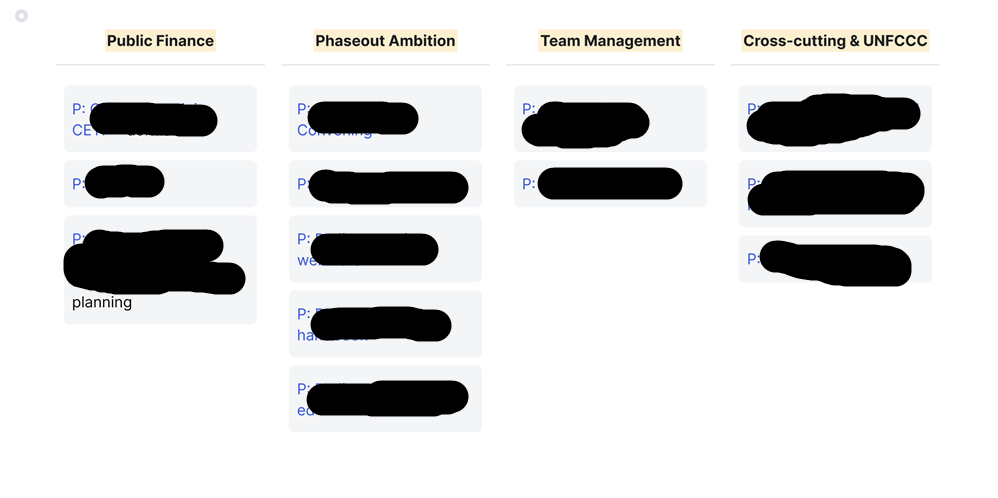
Lol sorry about the redactions, but you get the idea
I use “P” in my page titles to stand for “project”. At a glance I can see everything I have on my plate. When I worked as an academic, I had a kanban for papers I had on the go, with a column for each stage of the publication process.

I still technically have that kanban, it’s just a bit empty now.
Each project has its own page, which contains timelines, to-dos, links to relevant people, reading notes, and back-links to the notes I take on my daily notes page related to that project. On that page I can also set reminders for myself that automatically pop up on my daily notes (ie my homepage) on a given date. That is very handy for managing project timelines.
Powerful reading notes
A second way I use Roam is to make reading notes. These aren’t just any reading notes, however. Any time I’m making notes from something I’m reading, and the writer refers to another work, be that a book, legal case, or blog post, I can very easily create a page for that new reference and, if I want, create a reminder for myself to read it. If I’ve already read that other work, even better – I can link to my pre-existing page about it.
This was a true game-changer when writing my book. I could easily navigate the web of citations among case law, international treaties, and secondary literature.
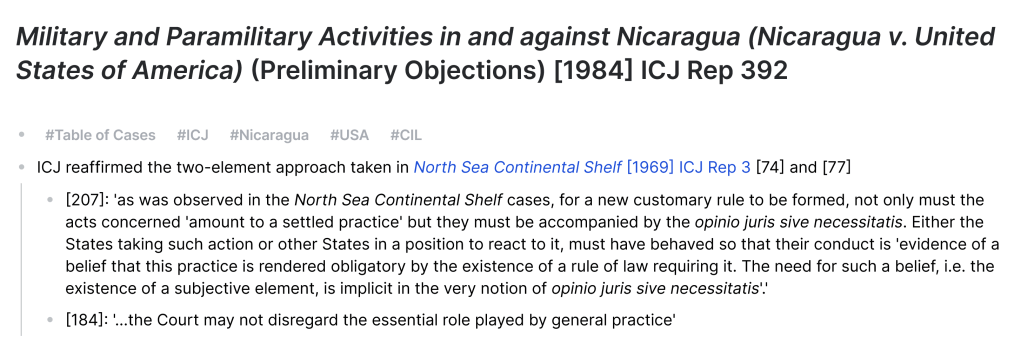
An example from an (old!) reading notes page. The tags function as pages as well — so if I click on #CIL, for instance, I can see all the notes I’ve ever taken relating to customary international law.
It’s not only easy to link to another page — you can even link to a single block (bullet point) within that page. I have outlined entire academic articles this way — incorporating notes and quotes from various sources structured with my own thoughts. The writing process is never easy or simple, but at least with this technology it’s possible to gather one’s sources effortlessly. And, speaking of effortlessness…
Effortless relationship management
I hate to break it to you, but if we’ve ever interacted since December 2019, you probably have a dedicated page in my Roam.
All I have to do is type in a name in Roam, with some square brackets around it, and it creates a page. When I click on that page I can see a record of every time I’ve made a note of our meetings/interactions for the last 6 years, alongside anything I want to remember about that person (how we met, their birthday, what have you).
It’s quite fun because often I’ll come across things I completely forgot about. It’s like a journal, but supercharged.
Why not Notion/Obsidian/etc?
In the years since Roam was reallly big in, like, 2020-2021, several other note-taking apps have taken off. Why not switch?
Okay, so…. the answer is partly “lock-in.” In no other app can I easily see what I was reading, writing and thinking in 2020. Yes, I could in theory export all my pages from Roam and upload them into another app. But for that hassle I’d want to see clear advantages, and no other app has demonstrated these. Yes, Notion is prettier. But is it that much better than Roam? Having played around with it, I don’t think so.
The other main reason is that I just really like Roam and have no desire to switch. The hype has largely passed, but the underlying product is still solid. It’s completely intuitive to use at this point, and feels cosy.
I also have a lot of respect for Roam as the note-taking app that changed the game. A lot of other apps have essentially copied it (and I hear even EverNote has implemented bidirectional links these days) but Roam was the first of its kind, and to me that inspires loyalty.
Finally, Roam has never tried to force generative AI on its users. This is a big one. It feels like the Roam team really value actual human thought. And so do I.
How does all of this interact with my paper notebook?
If you know me from work then you’ll have seen me toting around my large black notebook. There are three reasons for this. First, quite simply, it’s not always convenient or appropriate to be typing notes on a laptop at an in-person meeting. Second, I find that I retain more information when I hand-write.
Third, it’s often quite nice to be able to take oneself away from screens in order to do some deep work. Of course, if my hand-written pages are any good I’ll be transferring them to Roam later. But sometimes it’s just about the process of hand writing itself.
When I’m using my paper notebook, which isn’t every day, at the end of each day I note down the key points/highlights in Roam as far as they’re useful.
Inspired?
I feel like I’ve barely scratched the surface of what I use Roam for and why I like it.
If you are inspired by this post to check out Roam, let me know how you get on! I’d be interested to hear your experience. Or let me know what other app you use & love.

 Natalie Jones